

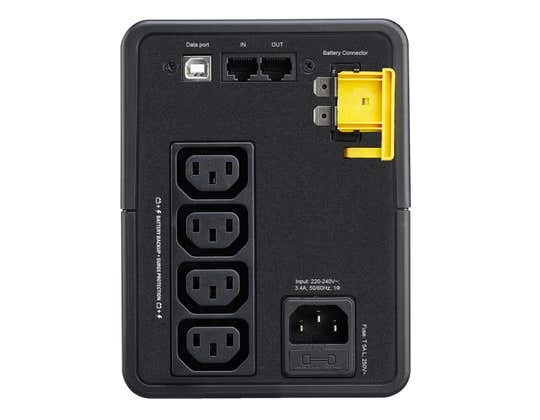
APC BX750MI Uninterruptible Power Supply with IEC C13
A 750 VA, 230 V tower UPS with AVR and four IEC C13 outlets. Check equipment demand and the cables needed for the intended connections before specifying it for a workstation.
Original price was: 316.21 SAR.297.24 SARCurrent price is: 297.24 SAR. excl. VAT
Available on backorder
RISYS can programme and prepare devices before delivery. Contact us for quantity and project details.
Wholesale and project supply — up to 45% off












Up to 45% off wholesale supply.
Overview
APC BX750MI pairs a 750 VA apparent power rating with IEC C13 output connections, making cable planning a central part of the buying decision. This tower UPS is rated at 230 V and incorporates automatic voltage regulation. Assess it around a particular workstation and the equipment that needs backup power there. Start by identifying the task that must be saved or stopped in an orderly way, then check the devices involved and the cable ends that will connect to the UPS. That process gives purchasing staff a defined requirement and gives the technician a connection arrangement to review before installation. It also avoids choosing solely by familiarity with the Back-UPS family name.
Connecting equipment to APC BX750MI
The output arrangement consists of 4 IEC C13 outlets. Check the cable end intended for the UPS against that outlet type before scheduling installation. The plug currently used at the wall is only part of the existing arrangement; review the complete connection between each device and its proposed backup supply. Preparing suitable cables in advance allows the installation team to work from an agreed plan rather than resolve connection choices after equipment has arrived.
Multiple outlets allow a defined equipment group to be connected, but the electrical assessment remains separate from socket allocation. Gather the requirements of the intended devices and have the combination reviewed against the UPS capacity. An unused outlet should not lead to another device being attached without that review. Keep the approved equipment list accessible to the people using the workstation, especially where employees share a desk or exchange peripherals during the working day.
Backup operation and voltage regulation
The UPS provides backup power when the incoming supply is lost, while AVR supplies automatic voltage regulation during operation. Include both functions in the discussion about the workstation’s power arrangement. Distinguish voltage variation from a complete interruption so staff understand why the unit is being installed. The technician can assess the electrical setup, while the operations manager defines the actions employees should take if the main supply fails.
Apparent power capacity is not a measure of working duration. Base the operational plan on the selected equipment and its demand, with a clear procedure for saving active work and shutting devices down. At an administration desk, that might mean assigning responsibility to the person using the workstation. At a service point, colleagues may need to coordinate their response. Define the task first, then identify which equipment needs to be included rather than assuming everything nearby should receive backup power.
Preparing an upright installation
The tower format requires an upright position within the local equipment layout. Consider the location of the connected devices and the routes of the cables running to the IEC C13 outlets. Preserve access for the person responsible for the equipment. Under a shared desk, clearly identified cable routes make it easier to see which connection serves each device. When furniture or equipment is moved, review the load and connection arrangement together instead of treating the change as purely a matter of space.
Saudi businesses can assess this model for an administration workstation, reception point or supervisory desk according to voltage, cable compatibility and actual demand. Confirm that the planned site supply suits the 230 V rating and that suitable cables are ready for the installation. A department name does not establish equipment compatibility. The technician should review the same device list that staff will use after handover, including any equipment moved into place as part of the office setup.
Comparing other Back-UPS models
When considering BX1600MI-MS or BX2200MI-MS alongside BX750MI, give the outlet and cable arrangement its own place in the comparison, separate from the capacity decision. Do not transfer a connection plan between models simply because the brand and family are familiar. Specify the full model on the purchase request and refer a proposed alternative for technical review. A suitable selection must address both the intended load and the means of connecting it.
Complete the handover with an approved equipment list and a staff procedure for an interruption. Assign responsibility for reviewing later additions, including their cable requirements. This keeps the workstation’s backup arrangement tied to the purpose that justified the purchase and gives future changes a clear review process.
Technical Specifications
- Brand
- APC
- Model
- BX750MI
- Mounting
- Tower
- Power
- 750 VA
Frequently Asked Questions
Which output connections does BX750MI use?
It has four IEC C13 outlets. Match the intended equipment cables to these connections before installation.
What are its power and voltage ratings?
The apparent power rating is 750 VA, and the voltage rating is 230 V.
Does it include AVR, and what is the format?
It incorporates automatic voltage regulation and is a tower unit.

APC UPS systems keep servers and network cabinets running through outages and unstable mains, and the wider APC range extends into the racks, power distribution and sensors around them. APC began in the United States as American Power Conversion and
Browse brand productsDelivery across Saudi Arabia
Clear warranty
Some devices or frequencies may require a permit or approval depending on the intended use and the regulations in force in the Kingdom. Requirements are clarified before project orders are fulfilled.
Customer Reviews
No ratings yet for this product
Only logged in customers who have purchased this product may leave a review.
Related Products

APC SRVL2KRIRK Online UPS 2000VA Lithium-ion
On backorder

APC SRV10KRILRK Online UPS with Rack Rails
On backorder

APC SRV10KRIRK Online Rack UPS 10 kVA
On backorder
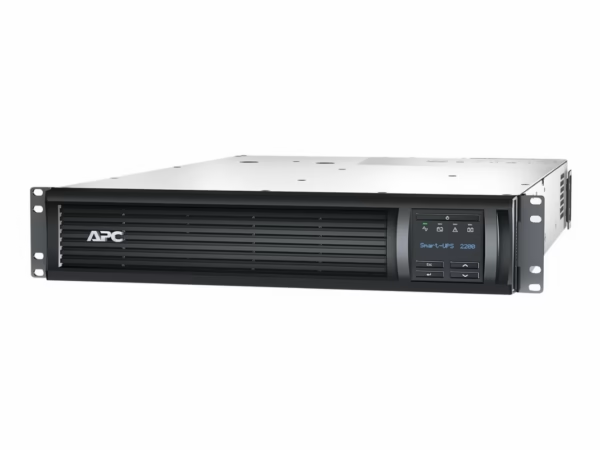
APC SMT2200RMI2UNC Smart-UPS 2200VA 2U with Network Card
On backorder
Reviews
There are no reviews yet.