
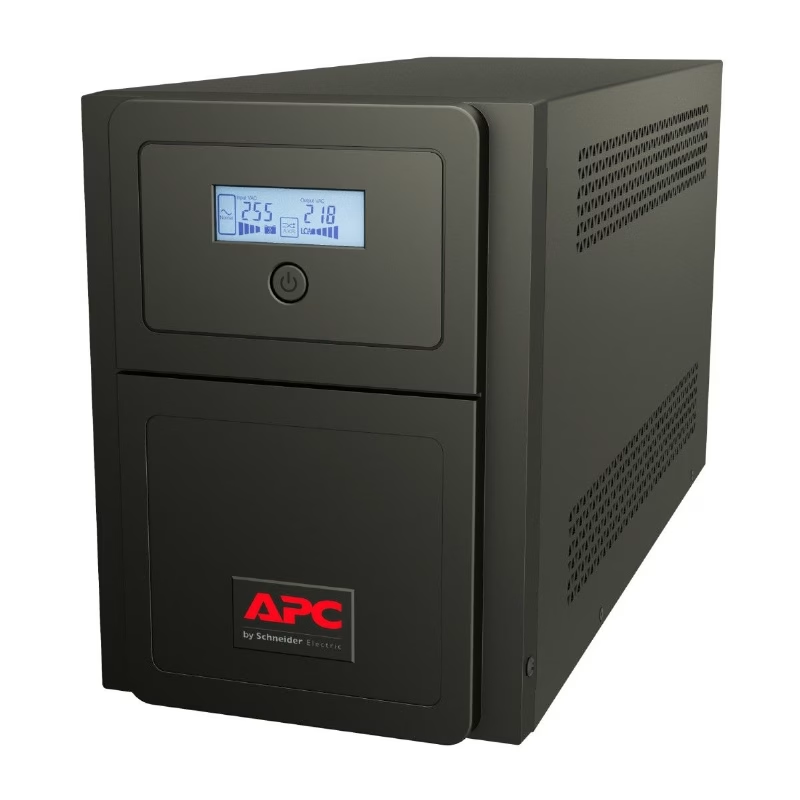
APC SMV1500AI-MSX Line Interactive UPS 1500 VA
A 1500 VA, 1050 W tower UPS with four universal outlets for a defined equipment group. Features 230 V operation, AVR, pure sine wave output and an LCD.
Original price was: 1,429.64 SAR.1,343.86 SARCurrent price is: 1,343.86 SAR. excl. VAT
Available on backorder
RISYS can programme and prepare devices before delivery. Contact us for quantity and project details.
Wholesale and project supply — up to 45% off












Up to 45% off wholesale supply.
Overview
APC SMV1500AI-MSX pairs 1500 VA and 1050 W output capacity with four universal outlets, making connection format a central part of its role within the Easy UPS family. It is a tower UPS for a deliberately selected equipment group, with 230 V operation and a line interactive design. AVR, pure sine wave output, an LCD and USB and serial management connections complete the combination. For a Saudi facilities manager evaluating backup power for a branch desk or a local equipment area, the buying decision starts with the devices that need protection. Confirm their combined electrical requirements and plug fit, then use those findings to decide whether this capacity tier and universal outlet layout belong in the installation.
APC SMV1500AI-MSX and the outlet decision
The universal outlet arrangement distinguishes this model from SMV1500AI, which uses IEC C13 connections. Consider that difference early if the site already has equipment power leads in place. Check every proposed plug against the chosen outlet format rather than assuming that a similar model reference means the same installation arrangement. Making the connection requirement explicit in the purchase order helps the installer receive the version that matches the agreed equipment plan.
Compared with SMV1000I-MSX, this model occupies a higher capacity tier while retaining a universal outlet approach. That is useful to evaluate when the connected load calls for a different electrical allowance but the site still wants that connection format. Size the UPS from the actual load schedule, keeping both its 1500 VA and 1050 W limits in the assessment. A capacity decision should follow equipment requirements; choosing a larger tier does not make unplanned additions to the protected group automatically suitable.
Managing a shared backup power group
Four outlets define the direct connection layout, while the total load remains a separate constraint. Assign equipment to the unit as a group, recording each device and its power lead. An office administration team might prioritise a workstation area, while a branch operations team might identify equipment used for local coordination. These are starting points for planning rather than automatic compatibility claims. Confirm the electrical requirements of the intended equipment before accepting either arrangement.
The combination of line interactive operation and AVR provides backup power with automatic voltage regulation. Pure sine wave output adds another selection requirement that can be carried into the equipment review. Treat these characteristics as part of the electrical specification for the installation, alongside capacity and outlet fit. This helps the facilities team explain why the UPS was selected and gives purchasing a concrete basis for comparing the required configuration with other options.
Access for staff and management connections
The LCD is available for local viewing at the tower. Plan its position so the responsible staff can reach the unit and see the display during routine visits. USB and serial ports give the installation management connection options; select the intended interface with the person responsible for the connected equipment. Cable routing should account for that connection as well as the power leads, keeping the relationship between the UPS and its equipment group easy to follow.
From purchase approval to site use
Before approving a rollout at a Saudi office or branch, agree the protected equipment list, verify its load and confirm the universal outlet arrangement. Reserve a freestanding location for the tower and identify who will maintain the connection plan. At handover, show the team which equipment belongs to the UPS and where its management cable runs. When a device is replaced, revisit the load assessment and plug fit rather than relying on the earlier approval. This turns model selection into a repeatable facilities process anchored to the site’s actual equipment.
Package Contents
- Documentation CD
- User manual
- USB cable
Technical Specifications
- Brand
- APC
- Display
- LCD
- Model
- SMV1500AI-MSX
- Mounting
- Tower
- Power
- 230V
- Ups Power
- 1500VA
Frequently Asked Questions
What output capacity does this model provide?
SMV1500AI-MSX has a capacity of 1500 VA and 1050 W.
How many outlets does it have?
It has four universal outlets. Match the proposed plugs and total load before installation.
How is it different from SMV1500AI?
SMV1500AI-MSX uses universal outlets, whereas SMV1500AI uses IEC C13 connections.
What local and management interfaces are available?
It provides an LCD for local viewing and USB and serial ports for management connections.

APC UPS systems keep servers and network cabinets running through outages and unstable mains, and the wider APC range extends into the racks, power distribution and sensors around them. APC began in the United States as American Power Conversion and
Browse brand productsDelivery across Saudi Arabia
Clear warranty
Some devices or frequencies may require a permit or approval depending on the intended use and the regulations in force in the Kingdom. Requirements are clarified before project orders are fulfilled.
Customer Reviews
No ratings yet for this product
Only logged in customers who have purchased this product may leave a review.
Related Products

APC SMV1000I Line Interactive UPS 1000 VA
On backorder

APC SRV10KRILRK Online UPS with Rack Rails
On backorder

APC SRVL2KRILRK Lithium-ion UPS 2000 VA
On backorder

APC SRT1000XLI Smart-UPS Tower UPS 1000 VA / 1000 W
On backorder
Reviews
There are no reviews yet.