

APC SMV2000AI-MSX Tower UPS 2000 VA
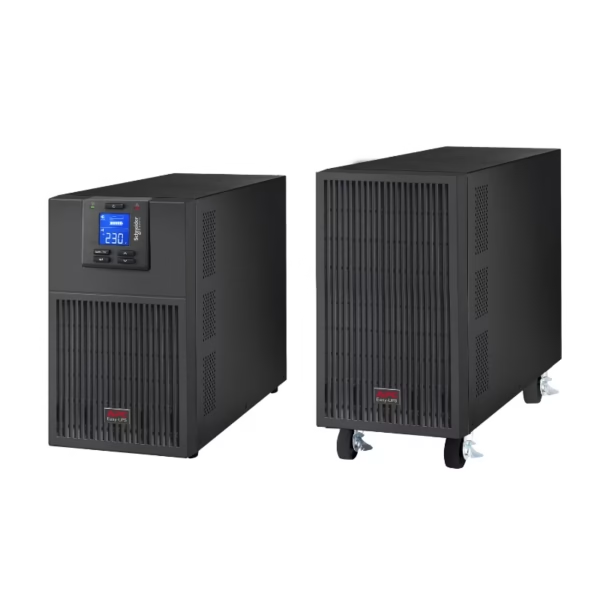
A 2000 VA, 230 V tower UPS with AVR, an LCD and six Universal outlets. Its Line Interactive design suits a locally accessible power arrangement for compatible workplace equipment.
Original price was: 2,079.89 SAR.1,955.10 SARCurrent price is: 1,955.10 SAR. excl. VAT
Available on backorder
RISYS can programme and prepare devices before delivery. Contact us for quantity and project details.
Wholesale and project supply — up to 45% off












Up to 45% off wholesale supply.
Overview
The APC SMV2000AI-MSX combines a 2000 VA apparent power rating with a tower format and six Universal outlets, making connection layout a central part of the buying decision. It operates at 230 V and brings together Line Interactive technology, automatic voltage regulation and an LCD for local status checks. For a Saudi branch office or facilities work area, the practical starting point is a defined group of compatible devices rather than every appliance nearby. Identify which equipment needs backup, check its electrical requirements and allocate the outlets accordingly. This model is particularly relevant when a freestanding installation and Universal connections fit the equipment arrangement that the site team wants to maintain.
APC SMV2000AI-MSX at the workstation
Six outlets give the installer a clear basis for mapping individual connections. Treat them as connection points within the overall load plan: an unused socket is not permission to add an arbitrary appliance. Separate equipment needed for the operational task from devices that can remain outside the backup arrangement. Check each intended plug against the Universal outlet before installation, and verify the connected equipment’s voltage requirements. That preparation helps avoid discovering a connection mismatch after desks or cabinets have already been positioned.
Voltage regulation and local visibility
AVR makes voltage regulation part of the unit’s role alongside its UPS function. When reviewing a site affected by supply variations, include that capability in the selection criteria rather than judging the unit on outlet count alone. The LCD gives staff a local interface for checking the UPS. Choose a position where the responsible person can approach the unit and see the display during routine checks. Putting it behind fixed furniture would make that useful interface harder to access during an operational handover.
Applications in Saudi workplaces
A branch administrator can assess this model for compatible office and network equipment grouped around a working area. A facilities or security office can use the same selection process for its desk equipment, provided the total load and connection requirements match the UPS. These are equipment planning decisions: the name of the department does not establish electrical suitability. Give the installer a device list and plug requirements, then agree which equipment belongs on the protected arrangement before moving existing connections.
Position within the Easy UPS family
Against SMV3000AI, this model’s purchase case centres on its own 2000 VA rating and Universal outlet arrangement. SMV3000AI offers a higher stated active power rating, so the comparison should start with the intended load and equipment connections. Consider SRV2KRIRK when the installation plan calls for equipment mounted in a rack. Keep the complete model name in the specification: membership of the Easy UPS family is a starting point for comparison, while mounting and connection details determine whether a particular unit belongs in the proposed location.
Preparing the installation
Record the intended devices, their electrical requirements and the outlet assigned to each before installation. Confirm the 230 V arrangement with the equipment requirements, and agree a tower location with accessible cable routes and a visible display. For handover, identify the responsible team member and show which devices receive power through the UPS. This makes subsequent desk changes easier to assess, because staff can review the connection plan before adding or replacing equipment.
For organisations managing several branches, retain the exact SMV2000AI-MSX identity in purchasing and site handover records. Revisit the load plan whenever a workstation changes, rather than treating the original installation as permanent permission for later additions. The resulting arrangement should make the relationship between the tower unit, its outlet allocation and the supported work area easy to understand. It gives the facilities team a specific configuration to maintain, with local LCD access and AVR forming part of the operational choice.
Package Contents
- Documentation CD
- User manual
- USB cable
Technical Specifications
- Brand
- APC
- Display
- LCD
- Model
- SMV2000AI-MSX
- Mounting
- Tower
- Power
- 2000VA
Frequently Asked Questions
What are its apparent power rating and voltage?
The SMV2000AI-MSX is rated at 2000 VA and 230 V.
Which outlets does it provide?
It has six Universal outlets. Check individual plug suitability and the total connected load before installation.
What mounting format and local features does it have?
It is a tower UPS with an LCD, AVR and a Line Interactive design.

APC UPS systems keep servers and network cabinets running through outages and unstable mains, and the wider APC range extends into the racks, power distribution and sensors around them. APC began in the United States as American Power Conversion and
Browse brand productsDelivery across Saudi Arabia
Clear warranty
Some devices or frequencies may require a permit or approval depending on the intended use and the regulations in force in the Kingdom. Requirements are clarified before project orders are fulfilled.
Customer Reviews
No ratings yet for this product
Only logged in customers who have purchased this product may leave a review.
Related Products

APC SMX3000HVNC 3kVA Smart-UPS with Network Card
On backorder

APC SMT2200IC Smart-UPS 2200VA 1980W Tower UPS
On backorder

APC SCL500RMI1UC Lithium-Ion 400W 1U Rackmount UPS
On backorder
APC SRV6KIL Tower UPS 6 kVA External Battery
On backorder
Reviews
There are no reviews yet.